

New CV builder mobile application solution to facilitate job seekers
The Inspirer.
A new technology dubbed ‘CVx Solution’ was released last night by All Trust Consult Ltd to enable people who are seeking jobs to easily and quickly make their CVs, print them or submit them immediately via email by using their smart phones.
The idea was from All Trust Consult and the App was developed by their partner Serge Didier Dushime under the joint Venture Project called ” The solution X” Between All Trust Consult and Indoto Tech House, the company whose developer is head.
“The system is simple. A CVx application user downloads the application from PlayStore. It’s a CV builder mobile application solution. The user can download it and build a CV in just less than 5 minutes,” said Franck Rubaduka, Founder and Chief Executive Officer of All Trust Consult.
“Poorly built CV plays a big role in the increase of unemployment to many job applicants. Since I was born I have never seen a teacher who taught me how to build a good CV. Whenever it came out to apply for a position, it was hard to sit down and write a CV. We came up with this solution and thought how there can be an application to make it easy. The application has all templets. We wanted to make everything simple,” Rubaduka explained.

Rubaduka told The Inspirer that Over 20 applicants have so far used the CVx application solution.
“It is already out and we are not going to launch it again. What we are going to do is to intensify the market,” he noted.
Steps to create a CV
- Download the application from Playstore in your android
2. Set it up or install it in your phone
3. Click on it & start building starting from:
* Your personal information
* education
* experience
* skills
* achievements
* Hobbies
* References
And when you’re done;
Click preview & double check if it’s all you wanted.
If yes,
You can print it or save it.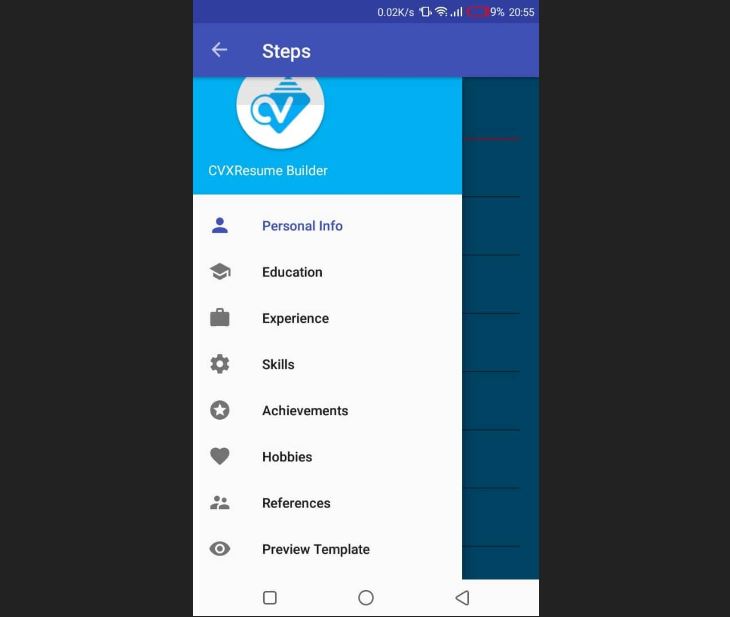
mobile CVx template 
Further details about the app: https://play.google.com/store/apps/details?id=com.didi.CVx https://thesolutionx.com/
theinspirerpublications@gmail.com




Leave a Reply